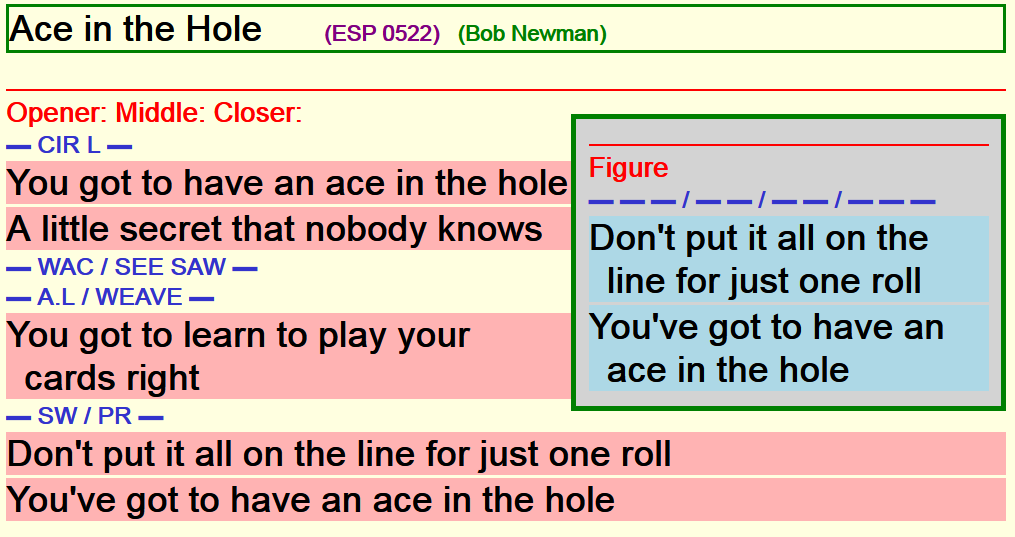
Over the years, I've created more than 500 lyrics files and all are available here. If some match songs that you have, and you like the the easy-to-read format, you can download those lyrics files and use them along with your other lyrics files. You can also download any lyrics file that is similar to what you need and then change the words in it and the filename to match a song you have.
You'll have to check out the examples or songs to see if the format works for you. I use indenting, color, lines and boxes to hopefully make the sections stand out so you'll know where you are on the lyrics page at any moment as the song plays.
You'll have to check out the examples and lyrics files to see if the format works for you. I use indenting, color, lines and boxes to hopefully make the sections stand out so you'll know where you are on the lyrics page at any moment as the song plays. And if you prefer other colors, font-sizes, indenting, etc, for your personal lyrics files, you can alter that too.
TEXT files vs WYSIWYG

All my lyrics files are simple TEXT files; in fact, all web files are simple TEXT files (with an .htm or .html filetype). The advantage is that you can use any free simple text editor (eg, NotePad, NotePad++, etc) to change words and codes in any file and you can change the colors, indents and font sizes in ALL the lyrics files by editing one control file. The disadvantage is that you have to be comfortable with codes like:
(eg, <p class=lyrics2>)
to describe what a line of text is since you won't see how it looks until you save the file and open it in SqView or a web browser.
In this case ...
p means start a new "paragraph" (ie, new line) and
lyrics2 gives the color and indent to the words you sing in the second (2) break.
Why?

I need glasses for reading small print ... but I don't use them when I'm calling. Mostly I watch my dancers in front of me and call by sight. So for any song I'm doing, I need to able to glance over at the computer and see the lyrics, and where I am, instantly.
Calling a song should be almost automatic; it's the relaxing part after putting the dancers (and yourself) through hopefully easy and interesting choreography with a small "taste" of challenge to make them think. For many of us, the choreo for a song is written down (and we read it) because not many of us can sight song choreo that bring us our corner in an interesting way in less than 64 beats -- all the time.
This means that the lyrics for a song should be very very easy to read because in reality you are only glancing at it to help keep you on the melody. You need to spend most of your time watching the dancers while "reading" your choreo (without making it too obvious, of course).
Readability
To achieve readability, you need to
- enlarge the text font so you can see while standing next to the table,
- use abbreviations that make the moves stand out instead of trying to read a "short story",
and - have consistency for all your lyrics so there's no second guessing
Choreo in Figures
Choreography is definitely needed in most lyrics files ... at least for the breaks. This is because some songs are recorded to allow 16 beats for singing during CIRLE LEFT, some allow 32 beats for GRAND SQUARE and others expect you to use a number of other moves at the beginning and only give you chance to sing during the WEAVE or SWING & PROMENADE ... and you need to know what is expected in the song.
Now you could include choreographic moves in the "Figure" part of the lyrics file as well ... but why would you? That would then limit the song to the same dance level and choreo each time you played the song. I occasionally added the choreo that came with the called side of the song ... if it was interesting or facilitated the lyrics. But in most cases it's so much more useful to capture that choreography elsewhere to use with any song. So very few of my lyrics files contain choreography for the figures; I add the needed choreography when I sing the song.