Lyrics Project

Create Your Own Lyrics Files

Summary of HTML Lyrics files

.html or .htm files are simply text files that contain tags to format the document. They involve a lot of typing because you have to type in the formatting tags as well as the actual lyrics. It is highly recommended that you find a lyrics file close to what you need for your song(s), download it and just modify the lyrics text before you tackle a file where you do your own coding. With that in mind, perhaps the following short summary will be enough to keep you out of trouble.

It's common to use the <p> (paragraph) tag but add classes to them to change how they look ...the indent level, the color, italics, etc (eg, <p> class="lyrics2"> to format the lyrics for the 2nd Break). Most tags do not need an EndTag (eg,<p> ... doesn't need a </p> tag ... because subsequent paragraph tags are assumed to end the previous paragraph) but the <div> and <span> tags (to define a division or area of the document) and the <font> tag DO require EndTags (</div>, </span>, </font>) ... or else the formatting they provide will screw up the formatting of the tags that follow. If your formatting carries on past where you think it should end, an EndTag might be missing.
Coding for the Lyrics Files

You can ignore (but copy) the manitory coding at the start and end of a .htm file. This leaves you free to work with the following common tags:
  (Note: classes do not need to be in quotation marks as shown)

   Song info
<p class=title>
Identifies the title of the song. By default this is title-normal.
Other classes are title-upbeat and title-relaxed.
<font class=label>
Identifies the label of the song.
<font class=artist>
Identifies the caller on the called side of the song. Dividers
<p class=hdr>
Identifies the Break (Open, Middle or Close), the Figure or Tag.
<p class=tagtext>
Identifies any lyrics needed in the ending Tag section of the song Lyrics & Choreo
<p class=lyrics>
Provides the proper indent and color for the lyrics for 1st and subsequent breaks; Other classes are lyrics2 and lyics3.
<p class=choreo>
Choreo for the break (eg, CIR LF, SFGS, B Start RT, etc). Other classes are choreo2 and choreo3 to match the indent of the lyrics. Identify Figure lyrics
<div class=box>
Provide a grey background around the lyrics of the Figure
Also <div class=float> To provide the grey box but "Floats" the box to the right side of the page instead of following in-line. Other Tags
<span class=note>
Adds a box with the word "Note" followed by your text. Could be used in a "choreo" snippet to identify a quick start.
  (<p class=choreo> SFGS <span class=note>Quick intro. Only 8 beats</span>).
<span class=extra>
Adds text in a red font. Could be used to identify a possible SW / PR call instead of just continuing to sing the lyrics and have the SW / PR be understood as default.

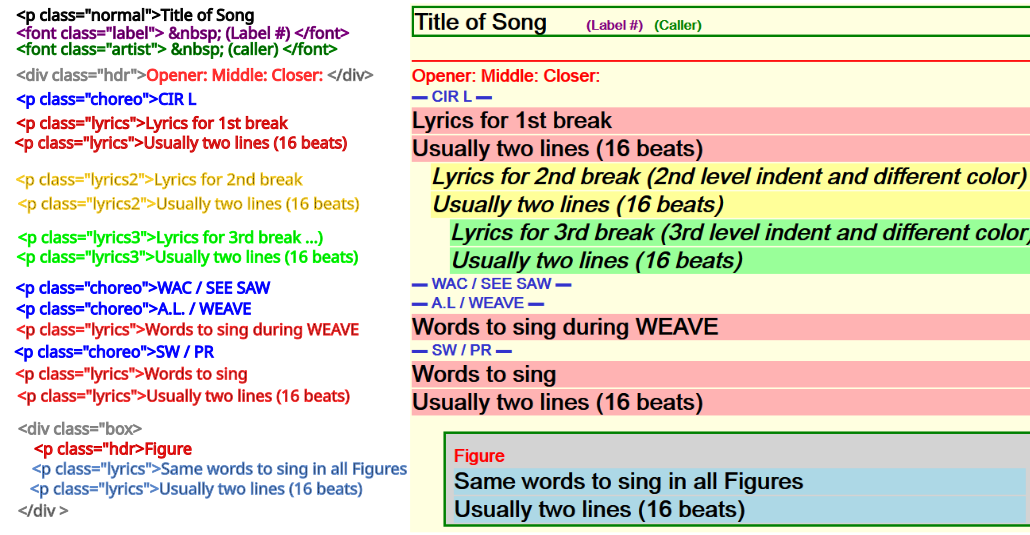
Example Coding and How it Displays